


Junsun 6+128GB 4G Wireless Car Player Android Auto Radio for Peugeot 307 307CC 307SW 2002-2013, Multimedia Player GPS Navigation RDS 2 Din Screen Auto Radio, Incar Entertainment, Vehicle Multimedia System, Sleek Car Stereo, T
Junsun 6+128GB 4G Wireless Car Player Android Auto Radio for Peugeot 307 307CC 307SW 2002-2013, Multimedia Player GPS Navigation RDS 2 Din Screen Auto Radio, Incar Entertainment, Vehicle Multimedia System, Sleek Car Stereo, T
Couldn't load pickup availability
- Gratis verzending
- 30 dagen bedenktijd
- Veilig betalen met iDEAL
SPECIFICATIONS
Auxiliary Input Type: Usb Auxiliary Input
Battery Properties: Without Battery
Brand: Junsun
Does It Include A Screen?: Yes
Item ID: RX4792228
Operating Voltage: ≤36V
Origin: Guangdong,China
Power Mode: Room electrical/hard wiring
Screen Size: 9Inch
Wireless Property: With Wi-Fi function
What distinguishes the WiFi version from the 4G version? The device includes navigation, music playback, parking assistance, and more. However, to connect the radio to the Internet, you must use your smartphone as a modem. Thus, for car owners who frequently use the Internet while on the road, we suggest opting for a 4G device. Keeping the phone in modem mode continuously will drain the battery quickly.
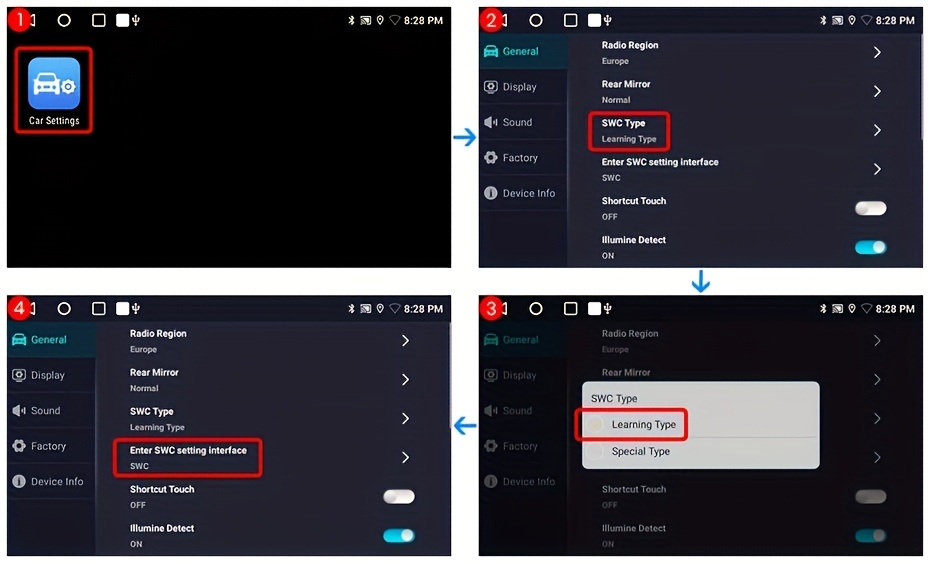
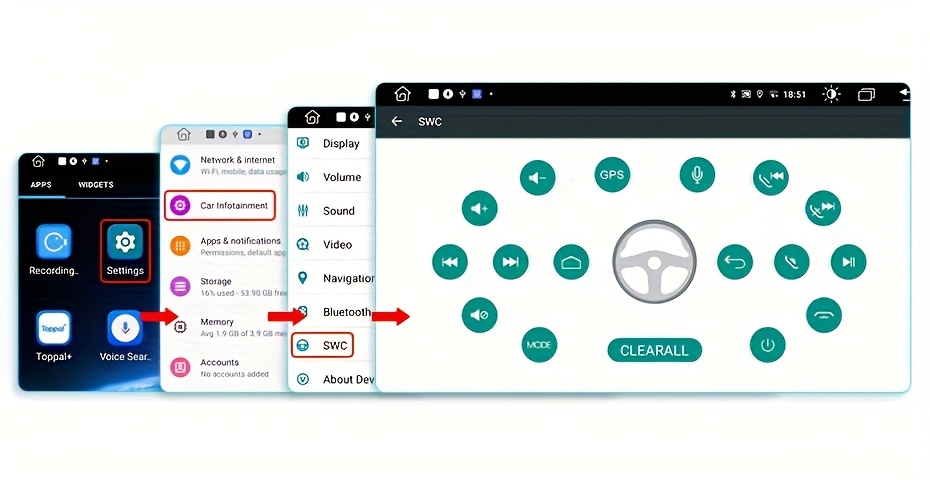
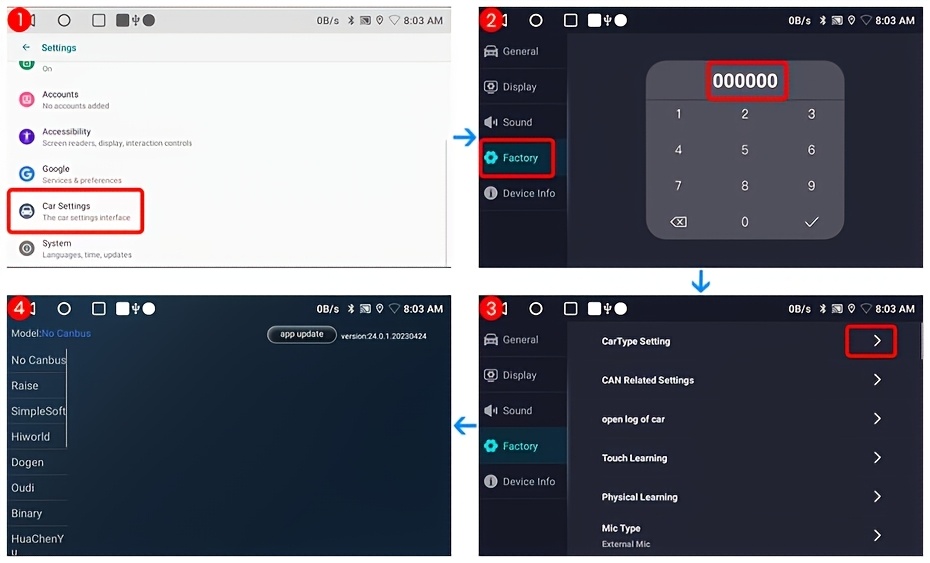
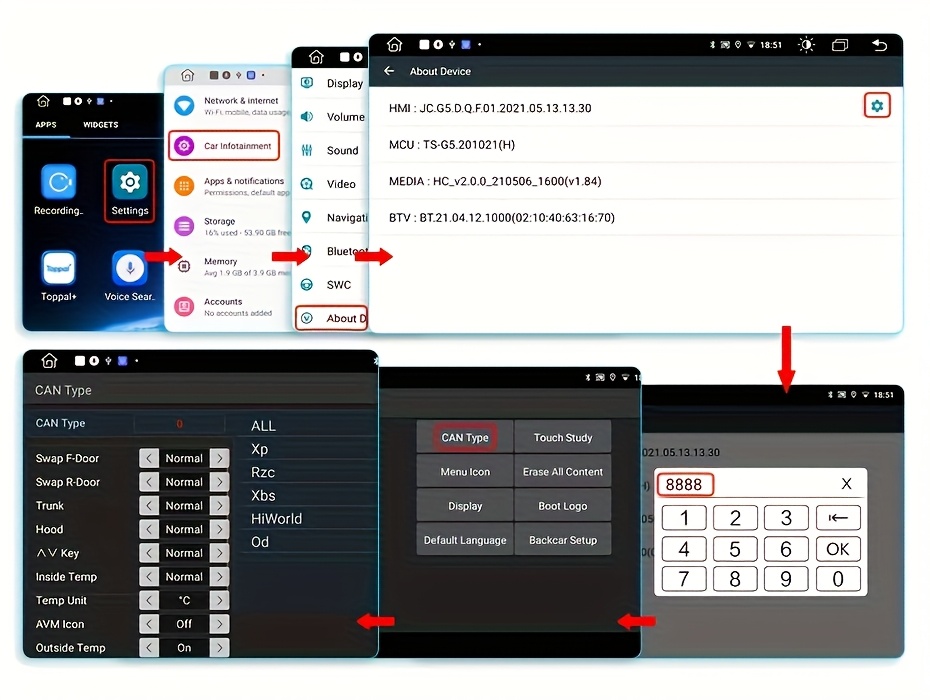
2. What are the steps to utilize Carplay and Android Auto? For wired Carplay, it requires a 4 Pin USB cable for connection, after which you should select the "AutoLink" or "ZLINK5" app on the car's radio; 3. What is the procedure for configuring steering wheel controls? 1) The product does not include Canbus. If you have bought V1/V1.C/V1 Pro/V1 Pro.C, please consult the image for setup instructions;
The product does not include Canbus. If you bought the V1 Plus, please look at the image for setup instructions.
The product includes Canbus; if you purchase V1/V1.C/V1 Pro/V1 Pro.C, please consult the image for setup.
The product includes Canbus; if you purchase the V1 Plus, please consult the image for setup.
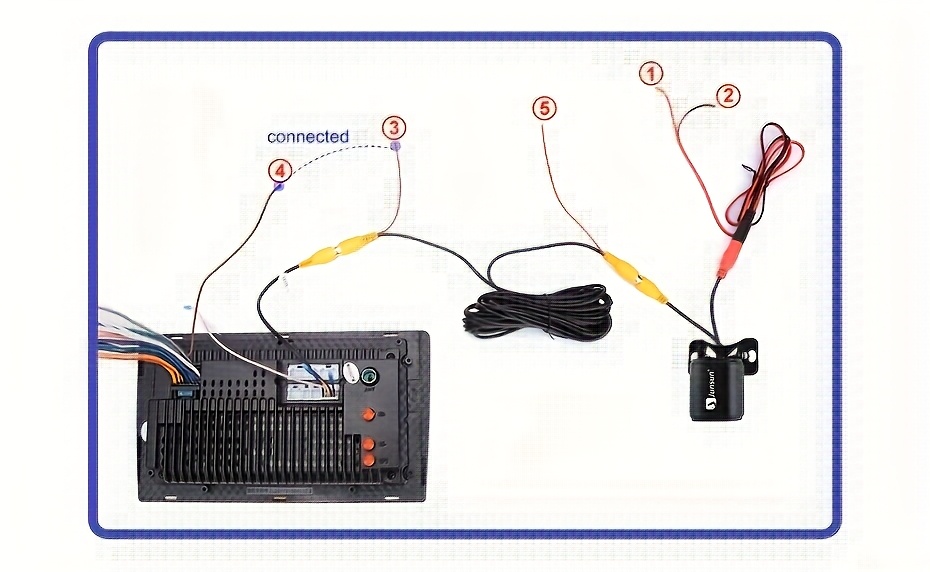
4. What is the procedure to alter the Boot Logo? Because of copyright restrictions, the logo of the automobile brand cannot be added or changed. 5. What steps are needed to link the rear camera? 1) The red wire ① should be attached to the positive terminal of the backup light. 2) The black wire ② should be connected to the negative terminal of the backup light. 3) The reversing detection wire ④ (brown) must be linked to the red wire ③ that extends from the video input cable. 4) The cable ⑤ does not require any connection.
Verzending & levertijd
Verzending & levertijd
Gratis verzending op het volledige assortiment, zonder minimum bestelbedrag. Je ontvangt een verzendbevestiging met track & trace zodra je bestelling onderweg is. Zie ons Verzendbeleid voor alle details.
Retourneren
Retourneren
Je hebt 30 dagen bedenktijd vanaf het moment dat je je bestelling hebt ontvangen. Zie ons Terugbetalingsbeleid voor de voorwaarden.


Beoordelingen
Strak en krachtig
Mooie strakke kookplaat, werkt perfect. Water kookt verrassend snel en de bediening reageert direct.
Makkelijk schoon te maken
Duidelijke bediening en het oppervlak veeg je zo schoon. Inbouwen was eenvoudiger dan verwacht.
Doet wat het moet doen
Precies zoals beschreven. Eén ster eraf omdat de handleiding vrij summier is, verder prima product.